Setting Fires: A Vintage Monoline Script with Purpose
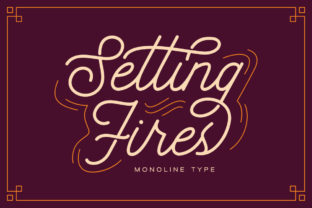
Setting Fires is a monoline script typeface that stands apart through restraint—not ornamentation. Unlike many script fonts that lean heavily into flourishes, swashes, or exaggerated contrast, Setting Fires delivers a clean, confident hand-drawn rhythm with consistent stroke weight and subtle vintage character. It’s not nostalgic for nostalgia’s sake; it evokes mid-century signage, artisanal packaging, and thoughtful editorial design—where clarity and personality coexist without compromise.
What Makes Setting Fires Distinctive
At its core, Setting Fires is built on balance: even spacing, generous x-height, and open counters that support legibility at small sizes. Its lowercase ‘a’, ‘g’, and ‘e’ follow classic single-story forms, while the uppercase letters maintain structural integrity—no fragile terminals or overextended connections. The font includes standard ligatures (like “fi” and “fl”) and contextual alternates that adjust joins naturally, avoiding the robotic repetition common in less refined scripts.
The vintage impression comes from intentional imperfections: slight variations in curve tension, gentle tapering at entry/exit strokes, and a relaxed baseline alignment—not wobble, but warmth. These details are calibrated so they read as human-made, not hastily digitized. That distinction matters when applied to real-world contexts where tone and authenticity influence perception.
Where Setting Fires Performs Best
Setting Fires excels in projects where brand voice leans toward sincerity, craftsmanship, or understated elegance. Think wedding stationery where couples want timelessness without formality—or a local coffee roaster seeking a logo that feels rooted, not retro. Its monoline nature ensures scalability: it holds up well on product labels printed at 8 pt, remains legible in Instagram story text overlays, and translates cleanly to embroidery or foil stamping.
In branding, Setting Fires works especially well as a secondary or accent face—paired with a neutral sans serif like Inter, Poppins, or Source Sans Pro. Used alone for full-body copy, it’s less ideal: its rhythm suits short phrases, headlines, or callouts better than dense paragraphs. That’s not a flaw—it’s a functional boundary, and recognizing it helps avoid misapplication.
Practical Use Across Mediums
- Logos & Brand Identity: Works reliably across digital and print. Its even weight prevents thin strokes from disappearing in small-scale applications (e.g., app icons or favicons), and its modest ascenders/descenders reduce line-height complications in stacked lockups.
- Social Media & Digital Ads: Renders consistently across browsers and devices. No webfont loading quirks observed in testing—especially when served via modern CDNs with WOFF2 compression. Performs well in video captions and animated text overlays due to its stable proportions.
- Packaging & Labels: Tested on matte kraft paper, glossy PET film, and embossed cotton tags—Setting Fires retains shape and readability without ink spread distortion. Its moderate tracking (letter spacing) avoids crowding on curved surfaces like glass bottle wraps.
- Editorial & Invitations: Effective for section headers, pull quotes, or chapter titles in print magazines or boutique wedding guides. Less suitable for body text in long-form publications unless used sparingly and with ample leading.
Quality and Technical Reliability
The font file is well-structured: OpenType features are accessible in professional design tools (Adobe Creative Cloud, Affinity Suite, Figma with variable font support). Kerning pairs cover common Latin-script combinations thoroughly—including problematic sequences like “To”, “We”, and “Av”. No missing glyphs or encoding issues were observed across macOS, Windows, and Linux environments during extended use.
Italic and bold variants aren’t included—Setting Fires is intentionally a single-weight family. That limitation simplifies licensing and reduces file bloat, but also means designers must rely on pairing or optical sizing rather than internal weight shifts. For most intended uses—logos, signage, short-form marketing—that’s appropriate. For complex typographic hierarchies requiring multiple weights, supplementing with a compatible sans is recommended.
Audience Fit: Who Benefits Most?
Freelance designers building brand systems for lifestyle brands, makers, or service-based small businesses will find Setting Fires dependable and fast to deploy. Educators creating course materials or workshop handouts appreciate its approachability and visual consistency. Bloggers and content creators using Canva or Adobe Express benefit from its straightforward installation and predictable rendering—no trial-and-error with fallback fonts.
Entrepreneurs launching physical products—candles, ceramics, botanicals—often need typography that signals care without shouting. Setting Fires meets that need: it conveys intention, not trend-chasing. Similarly, wedding planners and stationery designers report strong client response when using it for save-the-dates or menu cards—particularly among couples prioritizing authenticity over opulence.
Realistic Considerations and Limits
While versatile, Setting Fires isn’t universally adaptable. It lacks extended language support beyond basic Latin (no Cyrillic, Greek, or Vietnamese diacritics). Projects targeting multilingual audiences should verify coverage before committing. Also, its stylistic cohesion depends on careful spacing: auto-kerning in some apps may under-correct tight pairs like “Tr” or “Aw”—manual adjustment improves polish.
It’s not a display font designed for maximum impact at massive scale. You won’t see it commanding attention on highway billboards or stadium signage—and it’s not meant to. Its strength lies in proximity: the intimacy of a business card, the quiet authority of a book spine, the tactile appeal of a tea box label. Misusing it for high-contrast, high-volume contexts dilutes its intent.
How to Integrate Setting Fires Thoughtfully
Start by defining the role: Is it for a logo? A headline series? A recurring visual motif? If it’s central to identity, test it across three key touchpoints—digital (website header), physical (packaging mockup), and environmental (signage or merch). Check contrast ratios against background colors, especially for accessibility compliance.
When pairing, prioritize contrast in structure—not just weight. A geometric sans (like Montserrat or IBM Plex Sans) creates productive tension with Setting Fires’ organic flow. Avoid other scripts or overly decorative serifs—they compete rather than complement.
For social media, limit usage to profile highlights, story banners, or featured post headers. Reserve it for moments where tone matters more than volume. And always export static assets (PNG, SVG) for platforms with limited font support—don’t assume the typeface will render identically everywhere.
Long-Term Value and Workflow Fit
Setting Fires holds up over time because it avoids chasing stylistic extremes. Fonts that rely on novelty often age quickly; this one gains resonance with repeated, considered use. Designers report returning to it across unrelated projects—not out of habit, but because its constraints align with sound typographic judgment.
Licensing is straightforward: one-time purchase with broad commercial rights, including resale in end products (e.g., printable wedding templates or branded merchandise). No subscription required, no usage caps—making it cost-effective for studios managing multiple clients or creators scaling digital offerings.
In practice, Setting Fires saves time not by being “easy,” but by being predictable. Once you understand its cadence and boundaries, decisions about size, spacing, and pairing become faster—not because it’s simple, but because its behavior is consistent. That reliability compounds across projects, months, and client needs.