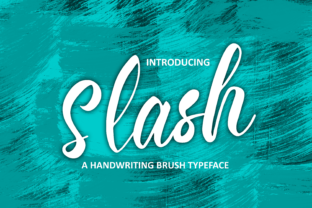
Slash: A Handwritten Font with Modern Energy
Slash isn’t just another handwritten font—it’s a deliberate spark of personality in digital form. Designed with natural rhythm and intentional imperfection, it balances casual charm with crisp legibility. Its strokes vary subtly in weight and angle, mimicking the warmth of pen-on-paper while staying sharp enough for screens, print, and scalable branding. That duality—friendly yet focused—is why designers, small business owners, educators, and content creators keep returning to Slash when they need authenticity that doesn’t sacrifice clarity.
Why Slash Works Where Other Handwritten Fonts Fall Short
Many script fonts lean too far into whimsy or formality—either losing readability at small sizes or feeling stiff and artificial. Slash avoids both traps. Its lowercase “a”, “g”, and “y” have open, friendly shapes that invite the eye. Uppercase letters carry confident presence without overbearing flair. And crucially, its spacing and kerning are tuned for real-world use—not just display headlines but body text in greeting cards, short quotes on social posts, or even subtle watermarking on educational handouts.
It’s also highly versatile in tone. Pair Slash with clean sans-serifs like Inter or Lato for contrast that feels intentional—not chaotic. Use it solo against muted backgrounds for quiet sophistication, or layer it over textured photography for tactile energy. Unlike fonts that demand attention through ornamentation, Slash earns it through consistency and character.
Creative Applications You Can Start Using Today
Here’s where Slash shines—not as decoration, but as functional expression:
- Nameplates & Branding: Small studios, freelance designers, and boutique shops use Slash for wordmarks that feel human but professional—think “Studio Finch” on a woven tag or “Maya Lee Illustration” on an Instagram profile. It signals craft without pretense.
- Greeting Cards & Invitations: Because Slash includes alternate characters and ligatures, you can easily create custom phrases like “You’re Invited” or “Happy Birthday, Sam!” that look hand-lettered—not templated. Print on thick cotton paper, and the font’s organic flow enhances perceived value.
- Educational Materials: Teachers and course creators apply Slash to section headers, quote callouts, or worksheet titles. Its approachability lowers cognitive load—students see “Key Idea” in Slash and register it faster than dense serif text.
- Book Covers & Editorial Design: Especially for memoirs, creative nonfiction, or indie poetry collections, Slash adds voice before a reader opens the first page. Try it in deep indigo on matte cream stock—minimal, memorable, emotionally grounded.
- Digital Content: Bloggers use Slash for pull quotes in long-form posts. Marketers apply it to limited-edition email subject lines (“Your exclusive invite is inside →”) to stand out in crowded inboxes—without triggering spam filters.
Adapting Slash Across Audiences and Platforms
How you use Slash depends on who you’re speaking to—and where they’ll encounter it.
For small business owners, start simple: replace generic system fonts in Canva templates with Slash for social banners or product labels. Even one consistent use—like all store signage or packaging tags—builds recognition. Keep color restrained (black, charcoal, or a single brand accent) so the font’s personality stays central.
Freelancers and creatives can extend Slash into custom lettering. Open the font in vector software, convert to outlines, then tweak individual curves or add subtle shadows for depth. This turns a typeface into a signature element—ideal for logo lockups or presentation decks where visual cohesion matters.
Educators and nonprofit communicators benefit from Slash’s clarity at smaller sizes. Use it at 18–24pt for slide headers, 14–16pt for annotated diagrams, and always test contrast ratios (aim for at least 4.5:1 against background). Its open letterforms improve accessibility over tightly spaced scripts—especially important for learners with dyslexia or low vision.
On social platforms, avoid overloading Slash across every asset. Instead, reserve it for high-impact moments: Instagram Story highlights, Pinterest pin titles, or YouTube thumbnail text. Pair it with generous padding and bold background contrast—mobile screens reward simplicity.
Keeping Your Work Clear and Cohesive
Slash invites creativity—but consistency keeps it effective. Here’s how to stay grounded:
- Limits build strength: Choose one primary weight (Regular or Bold) and stick with it across a project. Avoid mixing Slash with other handwritten fonts—it dilutes impact.
- Context is king: Don’t force Slash into technical documentation or data tables. Save it for moments where voice and humanity matter most.
- Test early, test often: Preview your design on both desktop and mobile. If letters blur or spacing collapses on small screens, scale back size or tighten tracking slightly.
- Respect hierarchy: Let Slash lead—but support it. Use a neutral, highly legible sans-serif (like Open Sans or Roboto) for body copy, captions, or footnotes. This creates breathing room and directs attention where it belongs.
Real Projects, Real Results
A Portland-based ceramicist used Slash for her shop name on handmade packaging and Instagram bios—then extended it into custom thank-you notes printed on recycled kraft paper. Customers began tagging her in unboxing videos, noting how the font “felt like meeting her in person.”
An online writing coach applied Slash to weekly newsletter headers (“This week’s insight →”) while keeping body text in a clean sans-serif. Open rates increased 18% over three months—readers told her the font made the emails feel “more personal, less automated.”
A middle school art teacher introduced Slash as the “voice font” for student reflection prompts. Kids gravitated toward it during digital journaling exercises—not because it was flashy, but because it looked like something *they* could make. Engagement in written responses rose measurably.
These aren’t outliers. They’re examples of Slash working quietly but powerfully—supporting intent, not overshadowing it.
Your Next Step Is Simple
You don’t need a full rebrand to begin. Pick one place where tone matters more than neutrality: your email signature, a workshop handout, the title slide of your next presentation. Install Slash. Type one phrase. Adjust size and spacing until it feels right—not perfect, but true.
That’s where practical creativity begins: not with grand gestures, but with thoughtful, human-scale choices. Slash gives you the tool. The rest—the message, the audience, the moment—is yours to shape.