Zafira: A Refined Script Font for Purposeful Typography
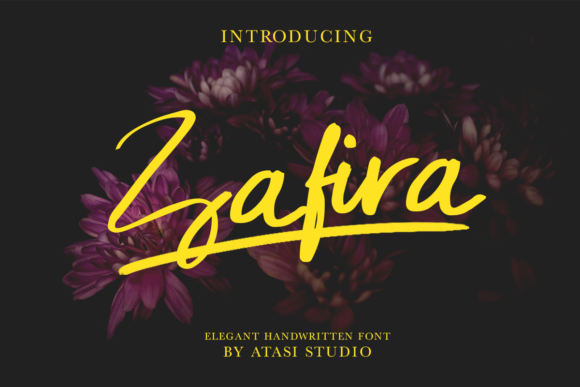
Zafira is a script font that balances visual presence with typographic restraint. It’s not designed to dominate or distract—it’s built to elevate. Whether you’re labeling a photography portfolio, reinforcing brand voice in a digital campaign, or setting a headline for a print magazine feature, Zafira delivers consistent elegance without sacrificing legibility or versatility. Its design reflects deliberate choices: subtle contrast between thick and thin strokes, graceful entry and exit terminals, and a natural rhythm that mimics skilled handwriting—yet remains highly controlled and reproducible across formats.
What Sets Zafira Apart from Other Script Fonts
Many script fonts fall into one of two categories: overly ornate (difficult to scale or pair) or overly simplified (lacking character). Zafira avoids both extremes. Its letterforms maintain personality while retaining structural integrity at sizes as small as 18px on screen or 10pt in print. The lowercase a, g, and y include gentle loops—not exaggerated flourishes—that support flow without compromising clarity. Uppercase letters carry enough weight to stand alone in logos or banners but retain proportionality when used alongside body text in mixed typography systems.
The spacing—both kerning and tracking—is thoughtfully tuned. Letters sit comfortably next to one another without crowding or awkward gaps, reducing the need for manual adjustment in most standard use cases. This reliability matters especially for time-constrained professionals: marketers preparing social assets, educators designing classroom posters, or freelancers building client websites where consistency across devices and platforms is non-negotiable.
Practical Applications Across Media and Workflows
Zafira performs well where expressive typography adds meaning—not decoration. In photography, it works effectively for watermarks: its elegance reinforces artistic intent without visually competing with the image. On websites, it serves best in hero sections, testimonials, or quote callouts—places where tone and human voice matter more than dense information delivery. For print, it holds up in magazine headlines, book covers, and event invitations, particularly when paired with a clean sans serif (e.g., Inter, Lato, or Montserrat) for contrast and hierarchy.
Real-world examples illustrate its adaptability:
- A boutique skincare brand uses Zafira for product names and taglines across packaging and Instagram posts—creating continuity between tactile and digital touchpoints.
- An educator designing workshop handouts applies Zafira to section headers and inspirational quotes, helping learners associate content with approachability and care.
- A freelance web designer implements Zafira via
@font-facefor animated hover effects on navigation items—its smooth curves translate cleanly to CSS transitions.
It also integrates reliably with common tools: Adobe Creative Cloud apps render it consistently; Google Fonts alternatives aren’t needed since it’s typically distributed as a self-hosted OTF/TTF package; and variable font versions (where available) allow fine-tuning of weight or width without loading multiple files.
Who Benefits Most—and When It Might Fall Short
Zafira suits professionals who prioritize intention over ornamentation. That includes small business owners crafting cohesive brand identities, bloggers seeking distinctive yet readable post titles, publishers developing editorial layouts, and creatives building portfolios where typography supports narrative rather than overshadows it.
It’s less suited for contexts demanding high-speed readability at small sizes—think legal disclaimers, data tables, or multi-line navigation menus. Its script nature means it shouldn’t be used for full paragraphs or body copy. Likewise, accessibility considerations apply: while Zafira itself isn’t inherently inaccessible, pairing it with sufficient color contrast, appropriate sizing, and semantic HTML structure remains essential for inclusive design.
One practical limitation worth noting: Zafira doesn’t include extended language support out of the box (e.g., Cyrillic, Greek, or Vietnamese diacritics). Users working with multilingual content may need to supplement with fallback fonts or verify licensing terms for expanded character sets. Also, while its OpenType features include standard ligatures and stylistic alternates, advanced typographic controls (like contextual swashes or discretionary ligatures) are limited—making it strong for clarity-focused projects, but less ideal for highly experimental typographic art.
Quality, Consistency, and Long-Term Usability
From a technical standpoint, Zafira is well-hinted and renders crisply across operating systems and browsers. Test results across Chrome, Safari, Firefox, and Edge show minimal glyph distortion—even at subpixel sizes on high-DPI displays. Print output remains stable whether exported from Illustrator, InDesign, or even PowerPoint, provided embedding permissions are respected per license.
Its file size is modest (under 150 KB for the full family), which supports fast page loads when self-hosted. Unlike some decorative fonts that require heavy JavaScript polyfills or complex loading strategies, Zafira works natively with modern @font-face declarations and respects system font fallbacks gracefully.
Long-term value emerges in reusability. Because Zafira avoids trend-driven exaggeration—no extreme tapering, no forced irregularity—it ages well. A logo set in Zafira today won’t look dated in three years, nor will a website header feel out of place after a redesign. That durability matters for creators managing ongoing projects or maintaining brand assets across evolving platforms.
Making the Right Choice for Your Project
Before choosing Zafira, consider your core objective. If you need a font to convey warmth, craftsmanship, or quiet confidence—without shouting—it’s a strong candidate. If your goal is functional clarity above all, or if your audience skims quickly across mobile interfaces, a more neutral option may serve better.
Test it early in your workflow. Try setting actual content—not placeholder text—in context: paste a real headline into your CMS preview, mock up a watermark over a representative photo, or print a sample poster at intended size. Pay attention to how it behaves next to supporting typefaces and whether its tone aligns with your message. Does “Handcrafted with Care” in Zafira reinforce sincerity—or unintentionally suggest fragility? Small distinctions like these determine real-world effectiveness.
Licensing is another pragmatic factor. Zafira is typically offered under commercial-use licenses that cover desktop, web, and app deployment—but always confirm scope before deploying at scale. Some versions restrict use in SaaS products or require extended licensing for broadcast or merchandise. Checking these details upfront prevents delays later.
In summary, Zafira earns its place not through novelty, but through thoughtful execution. It’s a tool that works quietly and reliably, letting content and intent take center stage—while still offering just enough distinction to be memorable. For professionals balancing aesthetics with practicality, that balance isn’t just convenient. It’s essential.