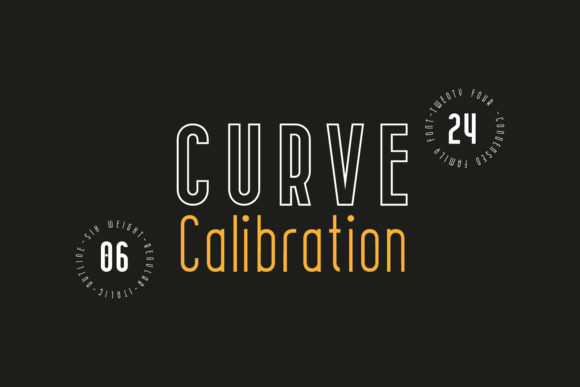
Curve Calibration Family: Precision Typography for Modern Design Systems
Typography isn’t just about legibility—it’s about intention, consistency, and quiet authority. When designers choose a typeface, they’re not selecting letters; they’re choosing a voice for their brand, a rhythm for their interface, and a foundation for scalability across devices, languages, and use cases. In this context, the Curve Calibration Family stands out—not with flamboyance, but with disciplined clarity.
A Sans Serif Built for Both Function and Presence
The Curve Calibration Family is a universal sans serif family designed from the ground up to serve dual roles: as a highly functional text face for long-form reading, and as a confident display font for headlines, branding, and motion graphics. Its defining traits—minimal stroke contrast, closed apertures, and geometric shapes—are not stylistic flourishes but carefully considered decisions that enhance readability at small sizes and visual impact at large ones.
Take the closed aperture, for example. Unlike open forms found in many neo-grotesques, Curve Calibration closes letterforms like a, e, and s. This subtle choice improves character distinction in low-resolution environments (think mobile UIs or embedded screens) and reinforces typographic cohesion across dense body copy. It also contributes to the family’s calm, measured tone—ideal for healthcare dashboards, financial reports, or educational platforms where clarity trumps ornamentation.
Sixteen Variations—Not Just Weights, But Thoughtful Expressions
With 16 distinct variations—including eight weights (from Thin to Black) paired with matching italics—the Curve Calibration Family offers granular control without compromise. These aren’t algorithmically slanted or interpolated versions. Each glyph is individually developed, ensuring optical harmony whether you’re setting a caption in Light Italic or a hero headline in Black.
- Thin & Thin Italic: Perfect for delicate UI labels or minimalist editorial subheads.
- Regular & Italic: The workhorse for body text—balanced x-height, generous counters, and even spacing.
- Bold & Bold Italic: Strong enough for section headers without overwhelming surrounding content.
- Black & Black Italic: Commanding presence for logos, posters, or immersive digital experiences.
This breadth means teams don’t need to layer multiple type families to achieve hierarchy. A single download delivers typographic continuity across wireframes, design systems, CMS templates, and developer handoff files. That reduces technical debt—and avoids the visual whiplash of mixing disparate fonts in one interface.
Why “Individually Developed Glyphs” Matters More Than You Think
Many sans serifs rely on interpolation: generating intermediate weights by mathematically averaging extremes. While efficient, this often results in uneven stroke modulation, inconsistent curves, or awkward proportions—especially in italics. The Curve Calibration Family rejects that shortcut. Every glyph across all 16 styles was drawn, refined, and tested by hand.
The result? Italics that feel like natural extensions—not slanted copies—of their upright counterparts. Numerals that maintain consistent width across weights for clean data tables. Punctuation that aligns optically, not mechanically. Even diacritics and extended Latin characters (including support for Vietnamese, Turkish, and Central European languages) were crafted with the same care.
This level of attention transforms typography from background utility into a subtle differentiator. Consider a SaaS dashboard showing real-time analytics: when numbers, labels, and alerts all share the same underlying rhythm, users process information faster—and trust the system more.
Where Curve Calibration Fits in Real-World Workflows
Designers and developers increasingly collaborate within component-driven ecosystems—Figma libraries, React design systems, or Shopify theme kits. The Curve Calibration Family thrives here because its architecture anticipates those constraints.
In Figma, for instance, its consistent metrics mean text styles sync cleanly across variants—no manual kerning overrides needed for headings. In CSS, variable font options (where available) allow smooth weight transitions with a single @font-face declaration, reducing HTTP requests and improving load performance. And for print-based applications—annual reports, exhibition signage, or packaging—the family’s high-resolution hinting ensures crisp rendering even at 6 pt or 144 pt.
It’s also built for accessibility-first thinking. The generous x-height improves lowercase legibility for readers with mild visual impairments. The restrained stroke contrast meets WCAG contrast recommendations when paired with appropriate backgrounds. And its monolinear construction avoids ambiguity in screen reader–assisted navigation, where letterform recognition can affect parsing accuracy.
Choosing Curve Calibration Over Alternatives: What to Weigh
When evaluating a new typeface, teams often ask: “Does it solve our actual problems—or just look nice?” With the Curve Calibration Family, the answer hinges on three practical considerations:
- Scale: If your project spans micro-interactions (button labels), mid-range interfaces (dashboard cards), and macro-applications (billboards or keynote slides), Curve Calibration’s range eliminates font switching fatigue.
- Localization needs: Its extended language support makes it viable for global product rollouts—without needing fallback fonts that break visual rhythm.
- Brand maturity: Startups may lean toward expressive fonts to stand out; established organizations often prioritize stability and neutrality. Curve Calibration delivers the latter without feeling sterile.
That said, it’s not a universal fit. If your brand voice leans heavily into handwritten warmth, retro charm, or editorial eccentricity, Curve Calibration’s precision may feel too reserved. Likewise, projects requiring extensive OpenType features—like discretionary ligatures or stylistic sets—may find its feature set intentionally streamlined rather than exhaustive.
Using Curve Calibration Effectively: Practical Tips
Even excellent typefaces underperform without thoughtful application. Here’s how to get the most from the Curve Calibration Family:
- Pair sparingly: Its strength lies in self-sufficiency. Avoid pairing it with other sans serifs unless there’s a strong conceptual reason—e.g., using Curve Calibration for UI text and a serif for long-form articles to create deliberate tonal separation.
- Leverage its geometry intentionally: Use uppercase settings for logos or short headlines to emphasize its clean, architectural quality—but switch to sentence case for body copy to preserve natural reading flow.
- Test at real sizes: Preview Regular at 14 px on a mobile device—not just in design tools. Its closed apertures shine in constrained spaces, but only if spacing and line height are tuned accordingly (we recommend 150–160% line height for web body text).
- Respect its neutrality: Curve Calibration doesn’t draw attention to itself—and that’s its superpower. Let color, layout, and content carry expressive weight, while the typeface provides silent, reliable structure.
One final note: licensing flexibility matters. Whether you’re embedding Curve Calibration in a mobile app, serving it via CDN for a high-traffic e-commerce site, or using it across internal documents and client presentations, confirm the license covers your specific usage model. Many teams overlook this until deployment—and discovering limitations mid-launch adds friction no design system should bear.
At its core, the Curve Calibration Family reflects a growing priority in digital design: doing more with less, but never sacrificing intentionality. It’s typography that works quietly, scales confidently, and adapts without apology—because great type shouldn’t shout. It should simply be right.