Freebird: A Minimalist Handwritten Font for Purposeful Design
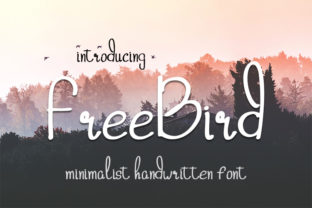
Freebird is a simple, minimalist, beautifully handwritten font designed for clarity and warmth—not ornamentation. It doesn’t shout. It invites. Its gentle curves, consistent spacing, and balanced weight make it exceptionally legible at small sizes and strikingly elegant at large ones. Unlike many script fonts that prioritize flourish over function, Freebird was built to work—across mediums, contexts, and intentions. That makes it especially valuable for professionals and creators who need typography that supports meaning, not distracts from it.
Where Freebird Fits in Your Creative or Business Workflow
Typography isn’t chosen in isolation—it’s selected as part of a larger process: defining intent, understanding audience, aligning with brand voice, and preparing assets for production. Freebird enters that process early—not as an afterthought, but as a deliberate choice when authenticity, approachability, or quiet confidence matters.
For example, a small business owner designing a new line of artisanal tea packaging might begin with product naming and messaging strategy. Only then does type selection follow—where Freebird becomes the natural bridge between hand-poured craftsmanship and clean, modern shelf presence. Similarly, an educator creating printable reflection prompts for students may choose Freebird not just for visual appeal, but because its organic rhythm feels less rigid than sans-serifs—supporting emotional openness without sacrificing readability.
Using Freebird Before a Project Begins
Preparation is where Freebird adds subtle but measurable value. Before opening design software or writing copy, ask: What feeling should this communicate? If the answer includes sincerity, calm, humanity, or grounded creativity, Freebird is worth testing alongside your core palette and layout structure.
Try pairing it with a neutral, highly legible sans-serif (like Inter or Lato) for body text—this creates a clear visual hierarchy while preserving warmth in headlines or callouts. Save time later by adding Freebird to your design system documentation or Figma library with preset styles (e.g., “Freebird – Quote Large,” “Freebird – Logo Lockup”). That ensures consistency across team members and future iterations—no re-selecting or second-guessing.
During Execution: Practical Integration Across Tools and Outputs
Freebird works reliably in widely used platforms: Adobe Creative Cloud (Illustrator, Photoshop, InDesign), Figma, Canva (via upload), and even modern web builders like Webflow and Squarespace. It’s available in OTF and TTF formats—no licensing surprises for commercial use, provided you source it from a legitimate vendor.
When using Freebird in digital interfaces, keep these usability considerations in mind:
- Line height matters. Set line-height to at least 1.4x the font size for longer blocks—even short quotes benefit from breathing room.
- Avoid all-caps usage. Freebird’s charm lives in its natural letter connections and varied ascenders/descenders. Uppercase flattens its character.
- Test contrast rigorously. Its thin strokes require sufficient contrast against backgrounds—especially on signage or apparel. Use WCAG-compliant contrast checkers before finalizing.
- Export smartly for web. Convert to WOFF2 for web use, and always include fallback fonts in CSS (e.g.,
font-family: "Freebird", cursive;) to maintain graceful degradation.
In print, Freebird shines on uncoated paper stocks—its texture complements the font’s tactile sensibility. For t-shirts or tote bags, simplify outlines and avoid fine internal details in the glyph set (like tight counters in “e” or “a”) that may not translate cleanly to screen printing.
After Delivery: Consistency, Maintenance, and Long-Term Use
Once Freebird is embedded in a brand or project, its real utility emerges over time—not in flash, but in reliability. A freelancer using Freebird across client decks, email headers, and proposal covers builds subconscious recognition. A blogger applying it consistently to pull quotes across hundreds of posts reinforces tone and trust.
Maintain that consistency by documenting usage rules—not just “use Freebird for headings,” but when and why:
- Use Freebird for standalone quotes, testimonials, and taglines—never for full paragraphs or data tables.
- Reserve it for human-centered messages: mission statements, gratitude notes, workshop titles, or values-driven calls-to-action.
- Retire it from contexts demanding urgency, authority, or technical precision—like error messages, legal disclaimers, or API documentation.
This kind of intentional deprecation prevents fatigue and preserves impact. Overuse dilutes distinction; disciplined use strengthens association.
How Freebird Interacts With Other Tools and Decisions
Freebird rarely stands alone. It functions best within a considered ecosystem:
- With color: Soft earth tones, muted blues, warm greys, and off-whites amplify its quiet confidence. Avoid high-saturation neons unless intentionally juxtaposing contrast for conceptual effect.
- With imagery: Works well alongside candid photography, hand-drawn illustrations, or minimal flat icons—but can compete with busy textures or intricate patterns.
- With voice and copy: Supports concise, empathetic language. If your message relies on jargon, speed, or dense information, Freebird may slow comprehension—not enhance it.
- With people: Stakeholders often respond more positively to Freebird in early mockups than overly stylized alternatives, making it a useful tool in collaborative alignment phases.
It also integrates smoothly into accessibility workflows. While script fonts are often flagged in automated audits, Freebird’s open forms and generous x-height mean it passes manual review when used appropriately—especially paired with strong semantic HTML structure and proper ARIA labeling in interactive contexts.
Implementation Tips You Can Apply Today
You don’t need a redesign to start benefiting from Freebird. Here are three low-effort, high-impact ways to integrate it now:
- Refresh one recurring asset. Replace the font in your email signature quote or LinkedIn banner headline. Track whether engagement (clicks, replies, profile views) shifts subtly over four weeks—often a sign the tone resonates more deeply.
- Create a reusable template. Build a single-page Canva or Figma template for social media quotes: fixed dimensions, pre-set Freebird styling, and placeholder text. Duplicate and customize per post—cutting decision fatigue and ensuring cohesion.
- Use it to signal transition. In long-form content (whitepapers, course modules, reports), apply Freebird only to section dividers or reflective questions. This creates psychological pacing—giving readers permission to pause, absorb, and re-engage.
None of these require approval, budget, or technical overhaul. They rely instead on observation, intention, and iterative refinement—the hallmarks of practical design thinking.
Why Freebird Endures Beyond Trends
Trends come and go—grunge, vaporwave, brutalism—but clarity, warmth, and restraint remain functional constants. Freebird endures because it answers a persistent need: how to communicate with care, without excess. It fits into workflows not as decoration, but as calibration—a way to adjust tone, emphasize humanity, and honor attention.
That makes it especially valuable for those managing multiple roles: the founder who designs their own website, the teacher who illustrates lesson handouts, the marketer who writes and formats campaign assets. Freebird reduces cognitive load—not by simplifying the message, but by removing visual noise that competes with it.
It won’t solve strategic misalignment or unclear objectives. But when those foundations are sound, Freebird helps them land—with grace, consistency, and quiet authority.