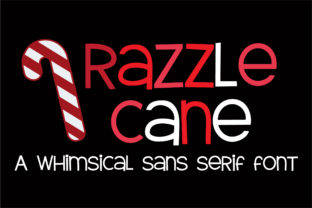
Razzle Cane: Whimsy with Purpose
Razzle Cane is a thoughtfully crafted sans-serif font—light on its feet but grounded in clarity. Designed as the sister to ZP Razzle Berry, its serif counterpart, it shares the same playful DNA but expresses it through clean lines, open counters, and subtle character quirks: a gently tapered ‘t’, a soft curve on the ‘a’, a friendly asymmetry in the ‘e’. It’s not cartoonish—it’s approachable, human, and quietly confident. That balance makes it unusually versatile: equally at home on a hand-lettered workshop flyer, a polished SaaS dashboard, or a minimalist book cover.
Why Designers Reach for Razzle Cane First
It solves real problems—not just aesthetic ones. Many sans-serifs fall into one of two traps: too rigid (implying cold efficiency) or too loose (risking legibility at small sizes). Razzle Cane avoids both. Its x-height is generous without crowding, its letter spacing is naturally breathable, and its weight range—from Light to Bold—offers clear visual hierarchy without needing multiple type families.
Designers use it when they want warmth *and* professionalism in the same breath. A freelance educator might choose Razzle Cane Light for course PDFs—readable at length, yet warmer than Helvetica. A boutique bakery could pair Razzle Cane Bold for signage with ZP Razzle Berry Regular for ingredient lists—creating instant cohesion across physical and digital touchpoints.
Pairing Done Right: Beyond “Just Try It”
The intentional sibling relationship between Razzle Cane and ZP Razzle Berry isn’t decorative—it’s functional. They share proportional rhythm, similar stroke contrast, and matching cap heights. That means when you set a headline in ZP Razzle Berry and body copy in Razzle Cane, alignment feels natural—not forced. No manual kerning gymnastics. No guessing at optical sizing.
Try this practical pairing system:
- Headline + Subhead: ZP Razzle Berry Bold + Razzle Cane Medium (ideal for blog posts, landing pages, or presentation decks)
- Branding System: Razzle Cane Bold for logos or wordmarks; ZP Razzle Berry Italic for taglines or quotes (works especially well for creative studios or indie publishers)
- Editorial Layout: ZP Razzle Berry Regular for pull quotes or captions; Razzle Cane Book for body text (creates gentle emphasis without visual noise)
This isn’t about matching fonts—it’s about building rhythm. When typography supports reading flow instead of interrupting it, your audience stays longer, understands more, and remembers better.
Real-World Uses That Go Beyond Decoration
Here’s where Razzle Cane earns its place in working toolkits—not just mood boards:
- Educators & Course Creators: Use Razzle Cane SemiBold for slide titles and Razzle Cane Regular for notes. Its open shapes reduce eye strain during long virtual sessions, and its friendliness lowers perceived cognitive load—especially helpful for adult learners returning to study after years away.
- Small Business Owners: Print a menu, product label, or seasonal promo postcard using Razzle Cane Bold for key info (price, date, offer) and ZP Razzle Berry for descriptive text. The contrast guides attention while keeping tone consistent—no need for stock photos or clip art to signal “handmade” or “thoughtful.”
- Bloggers & Newsletter Writers: Set email subject lines in Razzle Cane Medium (slightly larger than default, highly scannable), then use Razzle Cane Book for body copy. Unlike many display sans-serifs, it renders cleanly across Outlook, Gmail, and Apple Mail—even with fallbacks enabled.
- Nonprofit Communicators: Pair Razzle Cane with high-contrast color schemes (e.g., charcoal on cream) for accessibility. Its generous spacing and distinct lowercase ‘l’ vs. ‘1’ improve readability for aging audiences—a quiet but meaningful act of inclusion.
Making It Your Own—Without Losing Clarity
Customization matters—but only when it serves the message. Razzle Cane invites thoughtful adaptation, not arbitrary decoration. Here’s how to stay effective:
- Respect its proportions. Avoid extreme tracking adjustments. If text feels tight, switch to Razzle Cane Light before adding letter-spacing. If it feels airy, try Razzle Cane Medium instead of tightening.
- Use weight—not size—to signal importance. A 16px Razzle Cane Bold headline reads stronger than an 18px Regular. This keeps layouts responsive and accessible by default.
- Test early, test often. View your design on a phone screen at 100% zoom—not just desktop. Razzle Cane’s generous counters shine at small sizes, but only if line height is set to at least 1.45× font size.
- When in doubt, go monochrome. Its personality holds up beautifully without color. Let Razzle Cane carry tone so your imagery or messaging can carry meaning.
A Font That Supports—Not Steals—the Spotlight
Razzle Cane doesn’t shout. It listens. It’s designed for people who care about how words land—not just how they look. Whether you’re sketching a wireframe, drafting a grant application, designing packaging for a local maker, or choosing fonts for your first Shopify store, it gives you room to be clear, warm, and unmistakably yourself.
That’s rare. Most fonts ask you to adapt to them. Razzle Cane adapts with you—keeping pace whether you’re refining a brand identity over weeks or quickly styling a Canva social post before lunch. It works because it was built for doing, not just displaying.
So try it where consistency matters: in your style guide, your template library, your go-to Google Doc heading styles. Not as a flourish—but as infrastructure. Because the best creative tools don’t distract from your ideas. They help those ideas arrive exactly as intended.