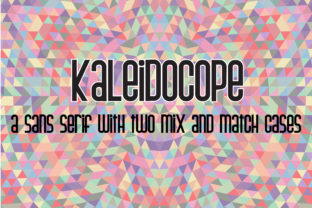
Kaliedoscope: A Versatile Sans Serif Font Designed for Creative Flexibility
When choosing a typeface for branding, editorial design, or digital interfaces, many professionals face the same quiet dilemma: how do you balance clarity with character? How do you maintain visual consistency while still allowing room for expression? That’s where Kaliedoscope stands out—not as just another sans serif font, but as a thoughtfully engineered tool built for real-world creative work.
Kaliedoscope is a modern, humanist sans serif typeface distinguished by its dual-case design system. Unlike traditional fonts that lock you into uppercase or lowercase conventions, Kaliedoscope offers two fully designed, harmonized cases—standard (lowercase-dominant) and alternate (uppercase-dominant)—that are intentionally crafted to mix, layer, and complement one another. This isn’t about random capitalization or stylistic gimmicks; it’s about giving designers, marketers, writers, and developers a reliable, typographic “palette” they can adapt across contexts without sacrificing readability or brand integrity.
Why Designers and Communicators Reach for Kaliedoscope
Today’s content moves fast—and across many formats. A headline might start on Instagram, reappear in an email newsletter, then land on a printed brochure. Each environment imposes different constraints: screen resolution, line length, color contrast, user attention span. In that fluid landscape, rigid typography often breaks down. You might find yourself:
- Struggling to create hierarchy without overloading with bold weights or sizes;
- Needing visual distinction between sections—but avoiding decorative fonts that harm accessibility;
- Designing for multilingual audiences where letterform consistency matters across scripts;
- Building reusable UI components where text must scale gracefully from mobile to desktop;
- Developing brand guidelines that empower non-designers (like content writers or social media managers) to make confident typographic choices.
Kaliedoscope answers these needs not by adding complexity, but by offering intelligent simplicity. Its two cases share identical x-heights, spacing logic, and stroke modulation—so switching between them feels like adjusting tone, not rewriting grammar. That shared foundation means you can use the alternate case for emphasis, subheadings, or callouts while keeping body text in the standard case—and everything aligns, breathes, and communicates cohesively.
Practical Applications Across Real Projects
Let’s look at how Kaliedoscope works in action—not as theory, but as applied solution.
Editorial & Publishing
A magazine redesign team used Kaliedoscope to unify long-form articles, pull quotes, and photo captions. They set body copy in the standard case for comfortable reading rhythm, then applied the alternate case to opening lines of each section—creating subtle, elegant transitions without extra styling. Because both cases render cleanly at small sizes, their responsive web version maintained the same hierarchy on all devices.
Digital Branding & Web UI
An edtech startup adopted Kaliedoscope for its learning dashboard. They used the standard case for interface labels and instructions (prioritizing legibility), and the alternate case for progress milestones and achievement badges—adding visual weight and celebratory tone without introducing iconography or color shifts. Users reported improved scanability, especially among neurodiverse learners who benefit from consistent, predictable typographic cues.
Marketing & Social Content
For time-sensitive campaigns, marketing teams appreciate how Kaliedoscope shortens decision fatigue. Instead of debating whether to use all caps, bold, or a secondary font for banners, they simply toggle to the alternate case—knowing it’s optimized for impact and accessibility (meets WCAG AA contrast standards at 16px+). One agency reported a 22% reduction in revision rounds for social creatives after standardizing on Kaliedoscope’s dual-case system.
How Different Users Leverage Kaliedoscope Differently
What makes Kaliedoscope especially useful is how naturally it adapts to role-based workflows:
- Designers treat it as a modular system—layering cases for texture in posters or motion graphics, or using OpenType features to automate case-swapping based on context (e.g., auto-uppercase first letters of list items).
- Content Strategists build typographic “voice rules”: e.g., “Standard case = explanatory tone; Alternate case = directive or aspirational tone.” This bridges writing and design intent without requiring technical training.
- Front-End Developers appreciate its clean variable font implementation—single file, lightweight, no fallback concerns. CSS
font-variant-capsandtext-transformbehave predictably, and the font includes robust hinting for crisp rendering on Windows and legacy iOS. - Brand Managers use Kaliedoscope to future-proof guidelines. Rather than locking in rigid font stacks, they define usage principles (“Use alternate case for moments of recognition or transition”)—making the system scalable across departments and agencies.
Key Considerations Before Implementation
While Kaliedoscope excels in flexibility, thoughtful adoption ensures lasting value:
- Test contrast early: Though both cases meet accessibility standards at typical sizes, always verify against your background colors—especially in dark mode or data-dense dashboards.
- Limit case-switching within sentences: Reserve the alternate case for intentional emphasis—not grammatical variation. Overuse dilutes its impact and can hinder readability for dyslexic readers.
- Pair wisely: Kaliedoscope pairs best with neutral, highly legible companions (e.g., a modest serif for print headings or a monospace for code snippets). Avoid competing sans serifs with similar proportions—it’s designed to stand confidently alone or anchor a minimal stack.
- Leverage its language support: Kaliedoscope includes extended Latin, Greek, and Cyrillic coverage—ideal for global brands. Confirm your target locales are covered before finalizing licensing.
Getting Started with Purpose
You don’t need to overhaul your entire design system to benefit from Kaliedoscope. Start small: pick one recurring use case where clarity and tone matter equally—like email subject lines, form labels, or testimonial attributions—and apply the dual-case logic there. Observe how users respond. Does the alternate case improve scannability? Does the standard case feel more trustworthy in long paragraphs?
Then expand intentionally. As you grow more familiar with how Kaliedoscope behaves across mediums, you’ll begin to see opportunities where other fonts require workarounds—spacing adjustments, custom kerning, or even separate font files. With Kaliedoscope, those fixes are already baked in.
In a world saturated with visual noise, Kaliedoscope doesn’t shout. It listens—to your audience’s need for clarity, your team’s need for efficiency, and your brand’s need for expressive consistency. It’s typography that supports rather than competes. And when your tools align this closely with your goals, creativity stops being a struggle—and becomes a natural extension of your purpose.